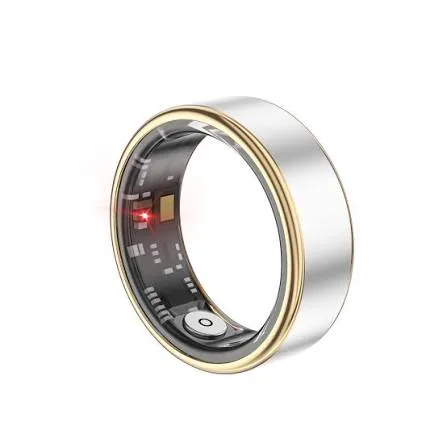
Smart Ring - Reverse engineering BLE communications
Introduction
I have always had a technical curiosity to understand the real functioning of the objects around me and I like to experiment on my own to go further. This is what led me to choose an IoT connected object and analyze it by reverse engineering. In this specific case, the objective was simple: observe the Bluetooth Low Energy communication between an Android application and a low-cost smart ring, then identify the commands exchanged in order to deepen my knowledge of the BLE protocol. The goal was not only to make the ring work outside its official application, but also to understand what such a basic connected object actually exposes.
This type of analysis is interesting because connected health devices handle sensitive data: heart rate, physical activity, sleep... Even if the accuracy of this kind of ring is debatable, the data remains personal.
Choosing the Smart Ring
I deliberately chose a cheap smart ring (<20€), easy to find, and working with the JRing application. The goal was not to buy a high-end product that would be difficult to analyze, but instead to start from a very accessible object used only for this project. These products are often technically simpler: few protections, proprietary but basic protocols, and sometimes no application-level encryption, which users are not necessarily aware of when buying this kind of connected object.
The simplicity of this connected ring is precisely what makes the analysis possible with standard hardware, and therefore easy to attack as well.
Tools used
For this analysis, I used:
- a Nordic nRF52840 dongle
- the frame analysis software Wireshark
- the nRF Sniffer for Bluetooth LE firmware for the dongle
- an Android phone with the JRing application
- the connected ring
The nRF52840 is used as a BLE sniffer and the use of Wireshark allow me to observe packets, filter communications, and analyze GATT/ATT exchanges once the connection is established.
Starting the communication
At first, I only saw advertising frames.
The ring was sending ADV_IND, and the phone sometimes responded with SCAN_REQ, followed by SCAN_RSP. But as soon as the JRing application seemed to connect to the ring, nothing useful appeared anymore.
The first obstacle was therefore to correctly capture the connection packet.
In BLE, the important packet is CONNECT_IND. It contains the parameters needed to follow the connection.
Without this packet, advertising traffic can be seen, but the communication on the data channels cannot be followed.
After several attempts and resets of the application and BLE connection, I finally captured the CONNECT_IND.
From that point, the following Wireshark filter can be used to focus on this connection:
btle.access_address == 0xaf9a82d7
The interesting part begins when the application actually exchanges GATT/ATT data with the ring.
Analyzing unencrypted frames
The most important point of this analysis is that the observed data is not encrypted at the application level. For a low-cost smart ring, this is a problem. Even if the product is not medical, it handles health-related data.
In the observed frames, the commands have a fairly simple structure: each frame is 20 bytes long and the first byte corresponds to the command. The following bytes contain fields whose role depends on the command.
General observed structure:
| Field | Description |
|---|---|
| Byte 0 | Command identifier |
| Payload | Data associated with the command |
| Padding | Zero padding used to complete the frame |
Analyzed frames
Several frames were analyzed during this test. Here are a few examples with screenshots from the application corresponding to the frames sent or received.
Main page
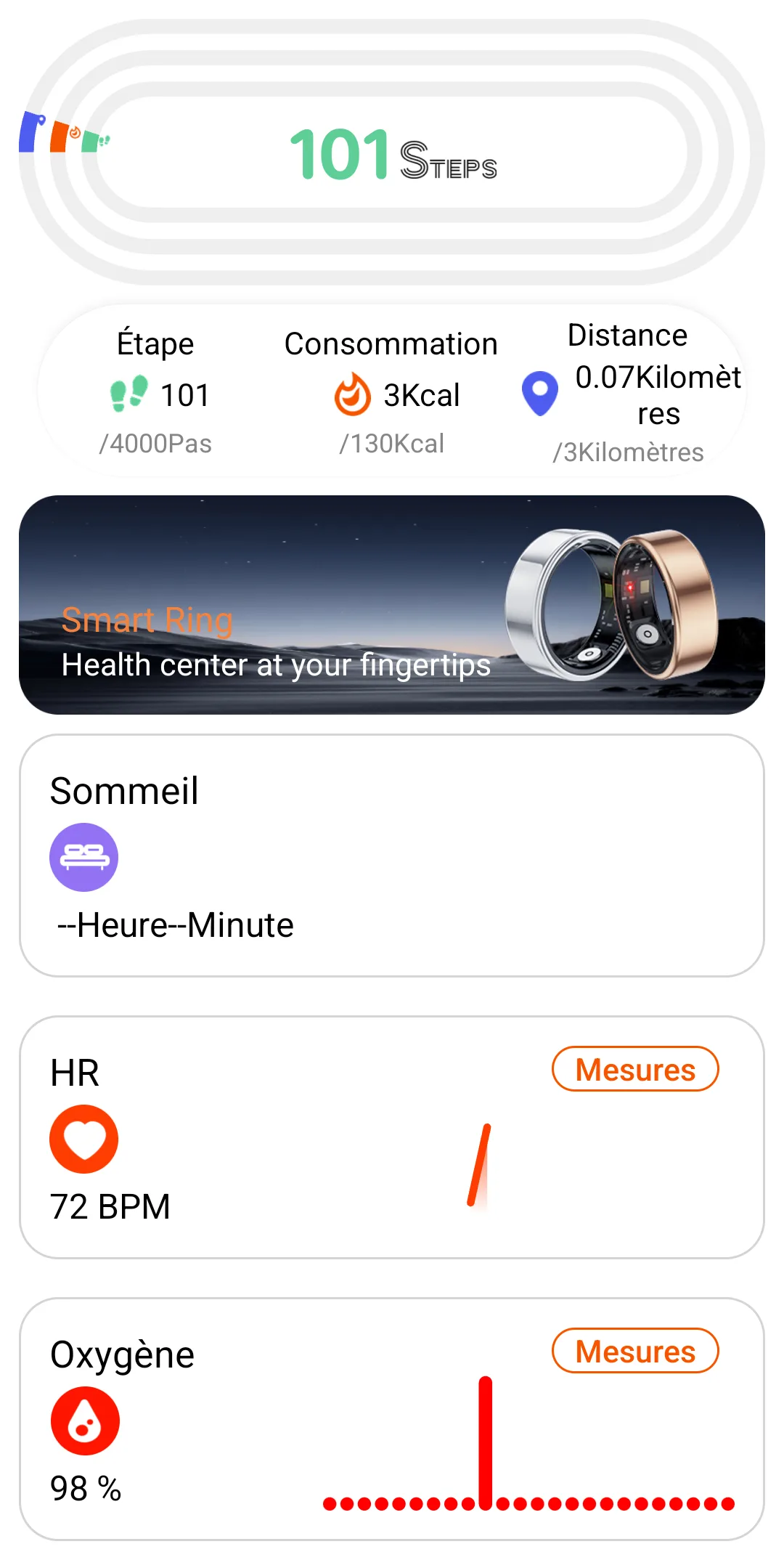
This frame seems to contain an activity summary visible on the main page.
03 9e6d4f6a 65000000 4e000000 03000000 000000
Wireshark screenshot
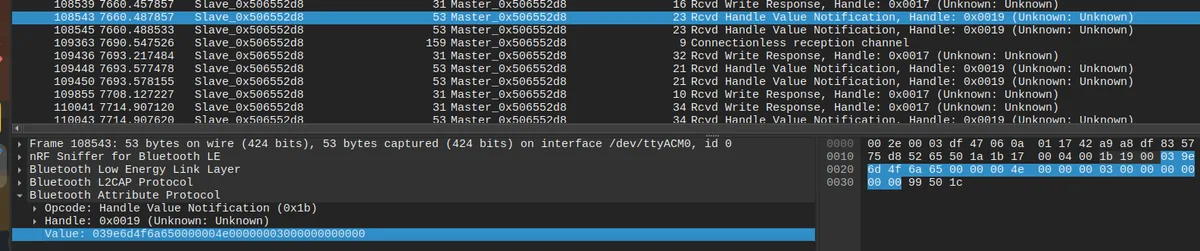
After analyzing this frame, the observed layout appears to be:
| Field | Value | Interpretation |
|---|---|---|
| Command | 03 | Summary |
| Unknown | 9e6d4f6a | Unidentified field |
| Steps | 65000000 | Step count |
| Distance | 4e000000 | Distance in meters |
| Consumption | 03000000 | Calories or estimated consumption |
| Padding | 000000 | Zero Padding |
Here, the decoded values are:
0x65corresponds to101Steps0x4ecorresponds to78Meters (0.07 Km)0x03corresponds to3KCalories
Periodic heart-rate measurement configuration
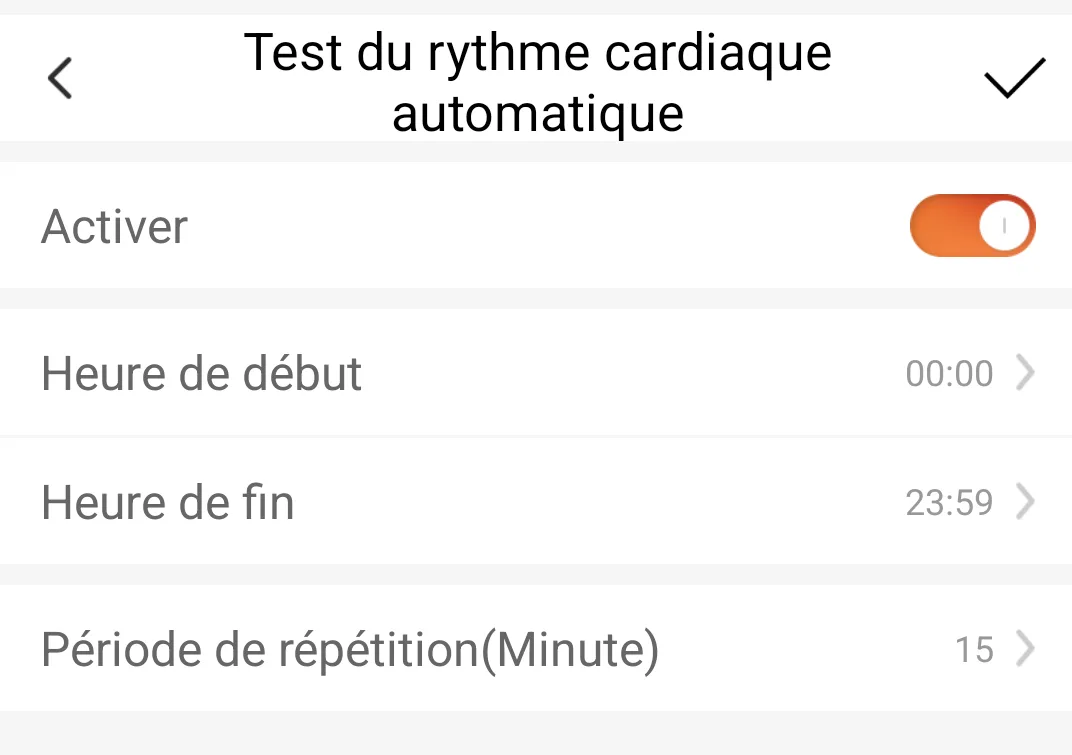
Another frame with information that is fairly easy to decode corresponds to the configuration of the heart-rate measurement period.
19 0000 173b 01 0f 01000000000000000000000000
| Field | Value | Interpretation |
|---|---|---|
| Command | 19 | Heart-rate measurement configuration |
| Start time | 0000 | Start of the measurement range |
| End time | 173b | End of the measurement range |
| Active | 01 | Measurement enabled |
| Period | 0f | Measurement period |
| Padding | 01000000000000000000000000 | Padding or unidentified options |
Here, the decoded values are:
0x0000corresponds to00:00for the start of the measurement range0x173bcorresponds to23:59for the end of the measurement range0x01corresponds to activation of this periodic measurement0x0fcorresponds to15(min) for the heart-rate measurement period
Other identified frames
Live BPM measurement
This frame corresponds to a live heart-rate measurement.
14 c26a4f6a 3b 0000000000000000000020000000
| Field | Value | Interpretation |
|---|---|---|
| Command | 14 | Live BPM measurement |
| Unknown | c26a4f6a | Unidentified field |
| BPM | 3b | Heart-rate value |
| Padding | 0000000000000000000020000000 | Padding or unidentified options |
Here, 0x3b corresponds to 59 in decimal.
Find my device
This command triggers the application's "Find my device" feature, which makes the connected ring blink.
04 05 000000000000000000000000000000000000
| Field | Value | Interpretation |
|---|---|---|
| Command | 04 | Find my device |
| Unknown | 05 | Unknown action or parameter |
| Padding | 000000000000000000000000000000000000 | Zero Padding |
Selfie mode ON
This command enables selfie mode and allows the ring to send a photo capture command when a hand movement is detected.
07 01 000000000000000000000000000000000000
| Field | Value | Interpretation |
|---|---|---|
| Command | 07 | Selfie mode |
| Active | 01 | Enabled |
| Padding | 000000000000000000000000000000000000 | Zero Padding |
Take Selfie
This command corresponds to the photo capture action. It necessarily follows the previous command.
06 02 000000000000000000000000000000000000
| Field | Value | Interpretation |
|---|---|---|
| Command | 06 | Take Selfie |
| Unknown | 02 | Action or state |
| Padding | 000000000000000000000000000000000000 | Zero Padding |
Security issue, cheap smart rings: be careful with sensitive data
The main weakness is the lack of visible encryption on the application data. A smart ring measures information that can be considered sensitive. Even if the device is sold as a gadget, it collects data related to the user's body and behavior.
Being able to observe commands, measurements, and some configurations directly in Wireshark shows that the protection is weak. A physically nearby attacker with a BLE sniffer could potentially observe part of the exchanges if the connection is not properly protected. In the observed case, the useful frames were readable, which makes the protocol easy to analyze but also raises a real question about the product's design.
This analysis shows that a cheap smart ring can be fairly simple to understand. This is interesting for learning, prototyping, or creating an alternative client. But it is also an important limitation of the product: if the protocol is easy to observe, user data may be easy to observe as well. This kind of connected object is often designed to work quickly with a mobile application, not necessarily to withstand local analysis or interception. For a product handling health data, even approximate data, this design choice is questionable.
Analyzing a common IoT object communicating over BLE
Several skills were needed to perform this reverse engineering:
- Understanding the basics of Bluetooth Low Energy
- Knowing how to use software such as Wireshark to analyze transmitted frames
- Decoding binary frames
- Methodical analysis to identify relevant info
The method is iterative. Capture, filter, compare, trigger an action in the application, then observe what changes in the frames while staying measured in the analysis. This is what makes it possible to go from an unknown sequence of bytes to the beginning of a documented protocol.
Note
This personal project was inspired by Saksham Bhutani's work around PulseLoop and the reverse engineering of a cheap BLE smart ring:
https://sakshambhutani.xyz/projects/20_project/
His approach made me want to reproduce the analysis on my side, with my own hardware, my own captures, and my own observations.